Permissions Analysis
Permissions Analysis is a graph-based permissions analysis tool that extends SAT's proven configuration security checks with comprehensive "who can access what resources" across your entire Databricks account.
Permissions Analysis may have incomplete and point-in-time data. Outputs are visibility and audit aids, not authoritative compliance determinations.
What Permissions Analysis does
Permissions Analysis transforms the Databricks permissions into a queryable graph database, enabling you to:
- Query Access Patterns: Find all resources a user/group/service principal can access—including indirect access via group membership and parent resource inheritance
- Reverse Lookup Security: Discover all principals (users, groups, service principals) that have access to a specific resource
- Detect Escalation Paths: Identify privilege escalation risks by finding paths from any principal to admin roles (Account Admin, Metastore Admin, Workspace Admin, Catalog Owner)
- Analyze Impersonation Risk: Discover lateral movement opportunities where users can modify jobs or clusters that run as elevated service principals
- Generate Compliance Reports: Produce audit-ready reports showing over-privileged users, orphaned resources, and high-risk principals
Common Use Cases
Getting Started
Step 1: Run Data Collection
SAT automatically creates a "SAT Permissions Analysis - Data Collection" job when you consent to “Deploy Permissions Analysis” during your SAT installation and runs automatically on a schedule. To run it manually:
- Navigate to Jobs & Pipelines
- Locate "SAT Permissions Analysis - Data Collection"
- Select "Run Now"
- Allow 10-30 minutes for completion (varies by account size)
The collection job queries Databricks APIs to build a complete graph of your environment's identities, resources, and permission relationships.
Step 2: Analyze Permissions - notebooks
Once data collection completes, use the pre-built interactive notebooks in /notebooks/brickhound/:
| Notebook | Purpose | Sample Query |
|---|---|---|
01_principal_resource_analysis.py | Query access patterns | "What tables can john.doe@company.com access?" "Who can access XYZ resource" |
02_escalation_paths.py | Find privilege escalation paths | "Can this contractor reach Account Admin?" |
03_impersonation_analysis.py | Analyze impersonation risks | "Who can run jobs as elevated service principals?" |
04_advanced_reports.py | Generate compliance reports | "List all users with access to 50+ resources" |
Step 3: Web UI (Recommended)
For a user-friendly interface, deploy the Permissions Analysis Databricks App:
Access at: https://<workspace-url>/apps/sat-permissions-exp
The web UI provides:
- Interactive search for principals and resources
- Escalation paths visualization
- Impersonation analysis reports
- Security reports including:
- Secret scope access
- High privilege principals
- Over-privileged users
- Orphaned resources
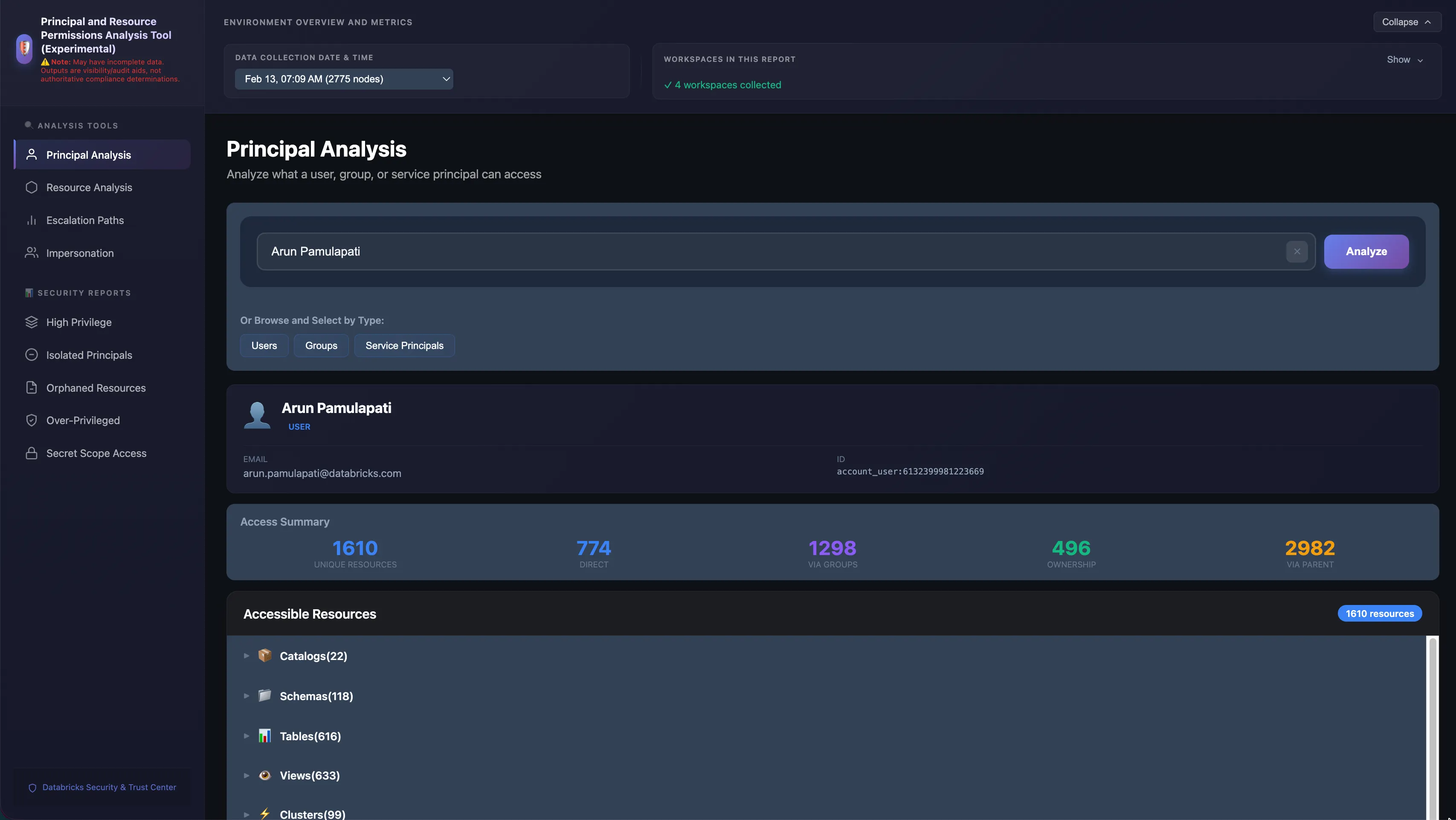
Key Capabilities
Query Access Patterns
Find all resources accessible by a specific principal, including:
- Direct permissions
- Group memberships (including nested groups)
- Inherited permissions from parent resources
- Service principal impersonation
Example Query: Determine what resources the principal john.doe@company.com can access.
Reverse Lookup Security
Discover all principals with access to a specific resource:
- Users with direct access
- Groups with access (and their members)
- Service principals with access
- Inherited access paths
Example Query: Identify all principals that can access the production.finance.revenue table.
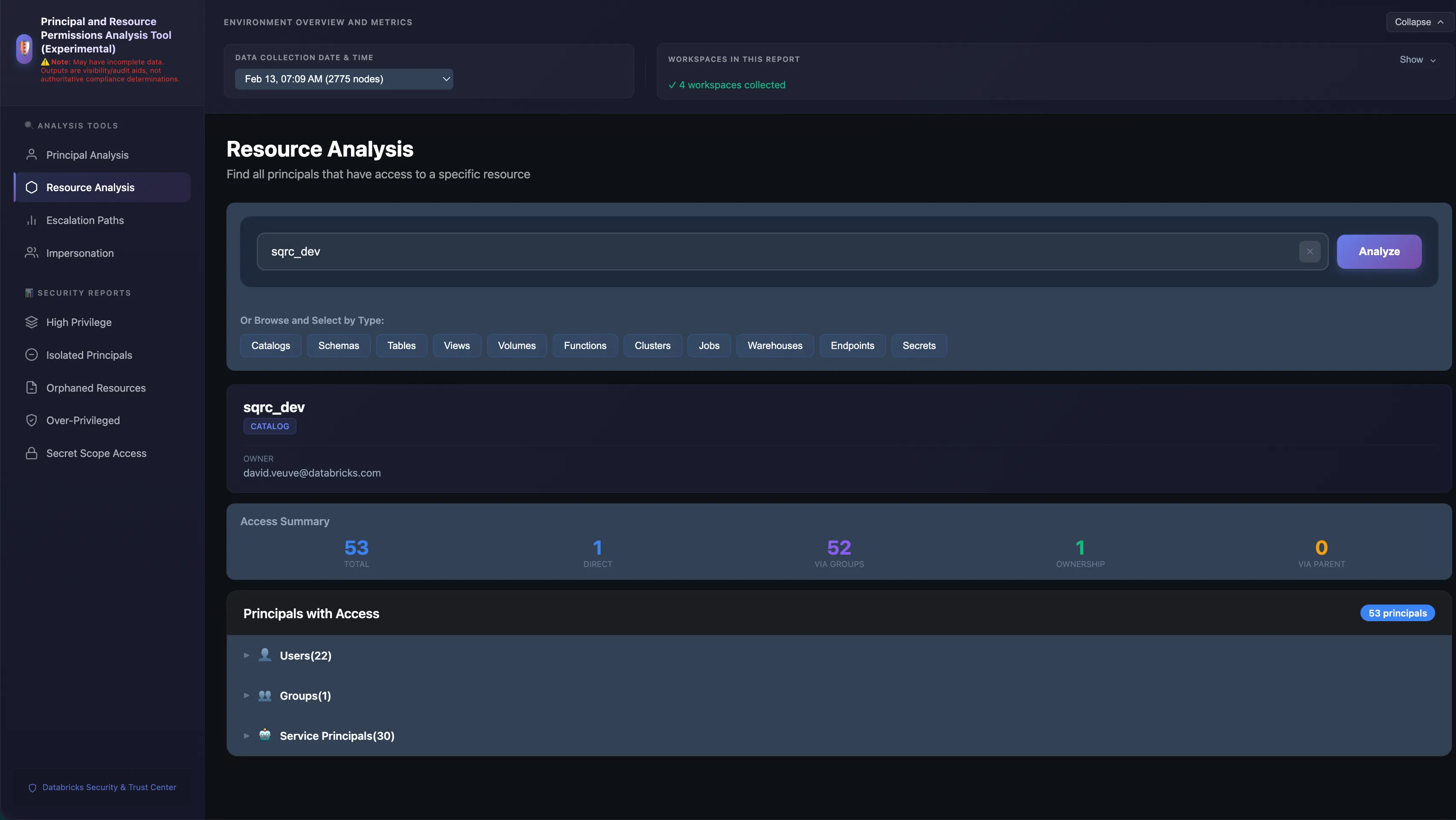
Detect Escalation Paths
Identify privilege escalation risks by finding paths to:
- Account Admin
- Metastore Admin
- Workspace Admin
- Catalog Owner
Example Query: Determine whether the principal contractor@external.com can reach Account Admin privileges.
Analyze Impersonation Risk
Discover lateral movement opportunities:
- Users who can modify jobs that run as service principals
- Service principals with elevated privileges
- Clusters configured to run as specific service principals
Example Query: Identify principals that can run jobs as elevated service principals.
Generate Compliance Reports
Produce audit-ready reports showing:
- Over-privileged users (access to 50+ resources)
- Orphaned resources (created by departed users)
- High-risk principals (multiple escalation paths)
- Secret scope access patterns
Best Practices
- Regular Data Collection: Run the data collection job regularly (weekly or bi-weekly) to maintain an up-to-date permissions graph as your environment changes.
- Web UI for Ad-Hoc Queries: Use the web UI for ad-hoc queries and quick access audits. Use the notebooks for automated reporting and compliance checks.
- Point-in-Time Data: Permissions data represents a point-in-time snapshot. For critical access reviews, ensure data collection has run recently.
Learn More
- Usage Guide - Instructions on running SAT workflows
- Installation Guide - Set up SAT and Permissions Analysis
- GitHub Issues - Report issues or request features