Cluster Configuration Secrets Scanning
SAT's secret scanning capability—previously limited to notebooks—now extends to cluster configurations.
Overview
Developers sometimes hardcode credentials in cluster environment variables during testing and forget to remove them. These secrets can persist for months, accessible to anyone who can view cluster configurations. SAT's Cluster Configuration Secrets Scanning helps you identify and remediate these security risks.
What It Does
SAT scans spark_env_vars in cluster configurations for hardcoded credentials using TruffleHog with 800+ detector patterns, including:
- AWS credentials: Access keys, secret keys, session tokens
- Azure secrets: Service principal keys, storage account keys
- GCP credentials: Service account keys, API keys
- GitHub tokens: Personal access tokens, OAuth tokens
- API keys: Stripe, Slack, SendGrid, and other service API keys
- Database passwords: Connection strings with embedded credentials
- Private keys: SSH keys, RSA keys, and other cryptographic material
- Databricks-specific tokens: DKEA, DAPI, DOSE tokens
Why It Matters
Hardcoded credentials in cluster configurations pose significant security risks:
- Persistent Exposure: Secrets remain in cluster configs until explicitly removed
- Broad Access: Anyone with cluster view permissions can see these secrets
- Compliance Violations: Hardcoded secrets violate security best practices and compliance requirements
- Attack Surface: Exposed credentials can be used to access cloud resources, databases, and external services
How It Works
- Data Collection: SAT scans all cluster configurations in your workspaces
- Pattern Detection: TruffleHog analyzes
spark_env_varsusing 800+ detector patterns - Correlation: Results are correlated with notebook scan findings for comprehensive secret exposure analysis
- Reporting: Findings are displayed in the SAT Dashboard and stored in the
clusters_secret_scan_resultstable
Viewing Results
Cluster secret scan results are available in multiple places:
SAT Dashboard
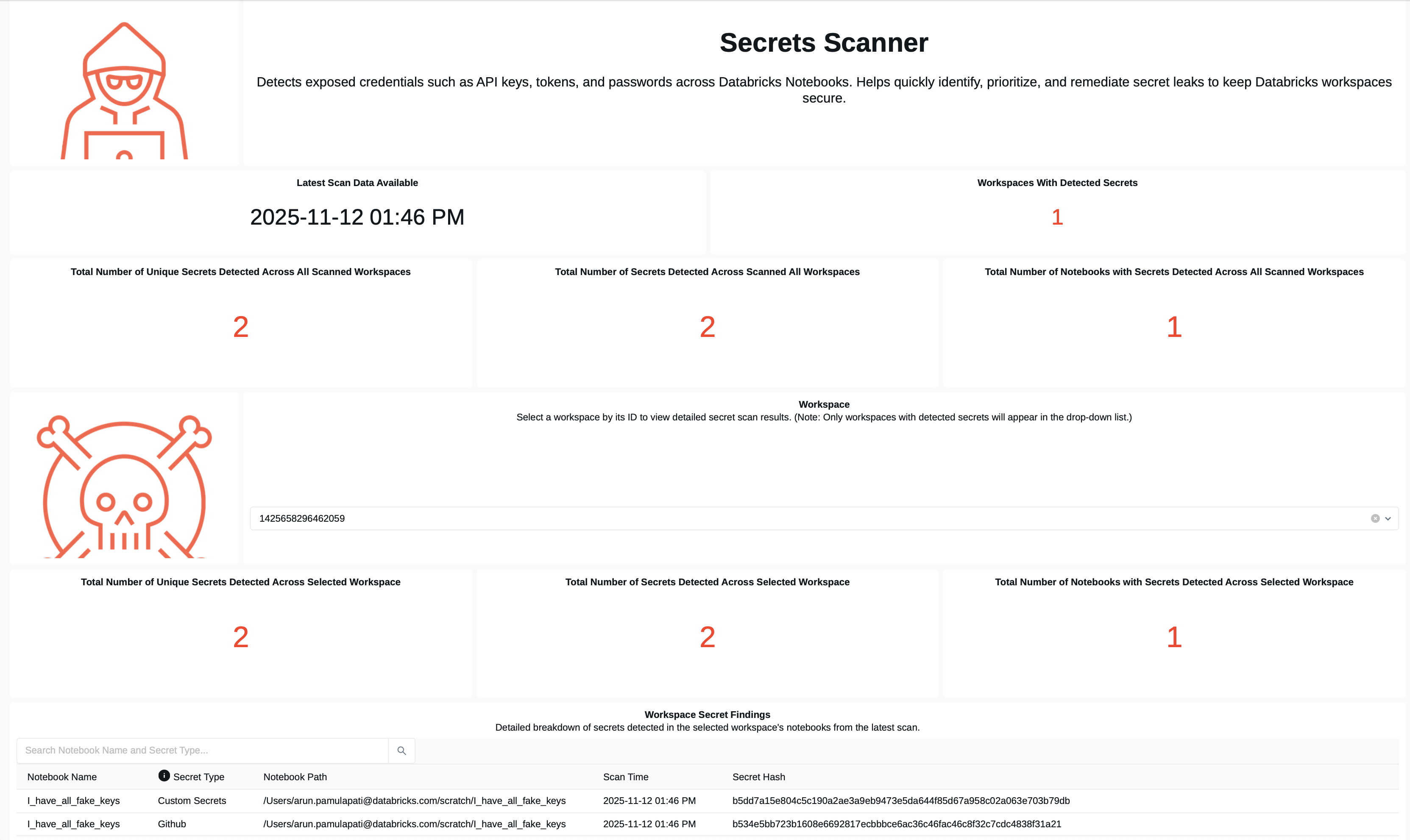
The Secret Scanner Dashboard displays cluster secret findings alongside notebook findings, providing a comprehensive view of secret exposure across your environment.
Database Tables
Results are stored in the clusters_secret_scan_results table within your SAT schema:
- Cluster ID: Identifier of the cluster with exposed secrets
- Cluster Name: Human-readable cluster name
- Environment Variable: The variable name containing the secret
- Detector: Type of secret detected (e.g., "AWS Secret Key")
- Severity: Risk level (HIGH, MEDIUM, LOW)
- Workspace: Workspace where the cluster was found
- Scan Timestamp: When the scan was performed
Example Finding
Cluster: dev-team-cluster
Environment Variable: AWS_SECRET_ACCESS_KEY
Detector: AWS Secret Key
Severity: HIGH
Recommendation: Move to Databricks Secrets
Remediation
High-severity findings should be remediated immediately by removing hardcoded secrets and moving them to Databricks Secrets.
Recommended Approach
- Remove Hardcoded Secrets: Delete the secret from the cluster's
spark_env_varsconfiguration - Use Databricks Secrets: Store credentials in Databricks Secrets (Databricks-backed or customer-managed)
- Reference Secrets: Update cluster configuration to reference secrets using
{{secrets/scope/key}}syntax - Verify Access: Ensure the cluster has appropriate permissions to access the secret scope
Example: Migrating to Databricks Secrets
Before (Insecure):
{
  "spark_env_vars": {
    "AWS_SECRET_ACCESS_KEY": "wJalrXUtnFEMI/K7MDENG/bPxRfiCYEXAMPLEKEY"
  }
}
After (Secure):
{
  "spark_env_vars": {
    "AWS_SECRET_ACCESS_KEY": "{{secrets/aws-credentials/secret-key}}"
  }
}
Configuration
Secret scanning behavior can be configured via the trufflehog_detectors.yaml file located in the configs folder:
- days_back: Controls how far back to search for modified clusters
- Set to
1to scan clusters modified in the last day (default) - Set to
7to scan clusters modified in the last week - Set to
0to scan ALL clusters in the workspace (no time filter)
- Set to
- page_size: Number of clusters to process per API page (default: 50)
- custom detectors: Add custom regex patterns to detect organization-specific secret formats
Firewall Allowlist Requirements
If your environment uses firewalls, you may need to allowlist the following GitHub domains to ensure secret scanning can download TruffleHog and access required resources:
If you encounter connection issues during secret scanning, ensure your firewall allows outbound connections to the following domains:
Add the following URLs to your firewall allowlist:
raw.githubusercontent.comgithub.comtoken.actions.githubusercontent.comrelease-assets.githubusercontent.com
Best Practices
Run cluster secret scans regularly (weekly or bi-weekly) to catch newly introduced secrets before they become security risks.
Consider implementing automated workflows to alert security teams when high-severity secrets are detected in cluster configurations.
Educate developers on using Databricks Secrets instead of hardcoding credentials. Include this in onboarding and security training.
Some patterns may trigger false positives. Review findings carefully and adjust detector patterns if needed.
Integration with Notebook Scanning
Cluster Configuration Secrets Scanning complements SAT's existing notebook secret scanning:
- Comprehensive Coverage: Identifies secrets in both notebooks and cluster configurations
- Correlated Analysis: Correlates findings to identify patterns of secret exposure
- Unified Reporting: All secret findings are displayed in a single dashboard
Learn More
- Usage Guide - Instructions on running SAT workflows and viewing results
- Permissions Analysis - Understand who can access cluster configurations
- General Dashboard - View comprehensive security findings